
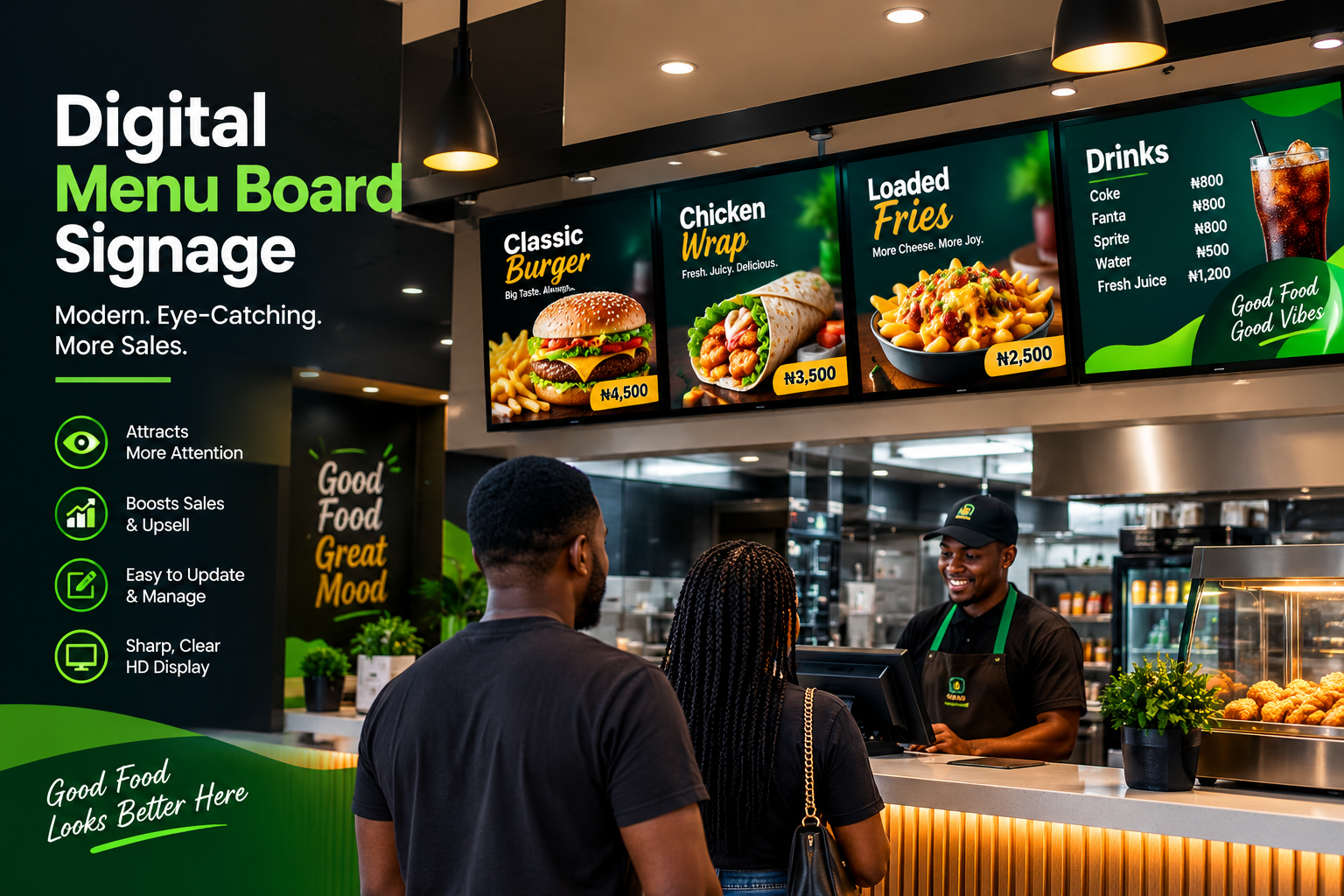
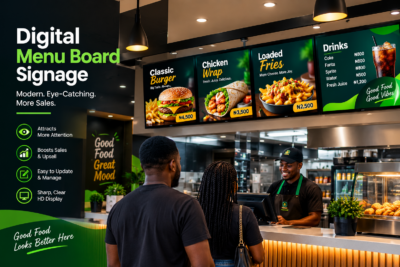
Digital menu board signage has become one of the most powerful upgrades a restaurant, café, bar, or quick-service business can make. Instead of printing menus that go out of date overnight, you can display professional content that updates instantly—prices, promotions, seasonal items, and even dietary information. When done correctly, a digital menu board also improves customer experience by making menus easier to read, easier to navigate, and more visually consistent with your brand.
This guide walks you through everything you need to know: what digital menu boards are best for, how to choose the right hardware and software, how to design a menu that people actually read, where to place your screens for maximum visibility, and how to maintain and update your signage so it always looks fresh.
Digital menu board signage is a type of restaurant digital signage that displays menu content on a screen—typically mounted near the entrance, counter, waiting area, or order station. The menu can be designed as a series of categories (e.g., Starters, Meals, Drinks, Desserts), with images, item names, and prices.
Unlike static paper menus, digital menus can be updated remotely (depending on the system), which means:
– You can change prices and promos without reprinting.
– You can rotate seasonal items quickly.
– You can correct mistakes immediately.
– You can schedule promotions for specific days or time windows.
Digital menu boards are also highly scalable: you can start with one screen and later add more displays across your locations or service areas.
Customers rarely study paper menus for long. They scan. If your menu isn’t easy to read—if fonts are too small, categories are confusing, or prices are unclear—people may hesitate, order less, or ask too many questions.
A well-designed digital menu board helps you capture attention faster and guide decision-making. Here are the main conversion benefits:
1. Faster scanning
Digital screens allow bigger text and cleaner spacing. Customers can find what they want within seconds.
2. More control over presentation
You decide the visual hierarchy: what’s most prominent, what’s secondary, and what’s an upsell.
3. Real-time freshness
Prices change. Ingredients change. Promotions change. Digital signage makes it possible to keep content accurate.
4. Better branding
Instead of generic menu templates, your menu can reflect your brand colors, imagery style, and tone of voice.
5. Seasonal promotions and urgency
You can highlight limited-time offers and special combos more effectively than paper menus.
Not all digital menu board signage is the same. The best solution depends on your budget, your update needs, and how your customers interact with your menu.
A) Display type and size
Most restaurants choose LCD/LED screens designed for digital signage. Common sizes range from compact counter displays to larger viewing screens for entrances.
Tip: Choose size based on viewing distance:
– Counter viewing: smaller screens can work if the text is large and readable.
– Entrance or wide dining areas: larger screens improve clarity and reduce customer strain.
B) Touchscreen vs non-touch
– Non-touch digital menu boards: simpler, generally more reliable, great for display and scanning.
– Touchscreen menu boards: useful if customers need help browsing categories, viewing details, or placing orders.
If you want an ordering experience (ordering kiosks, self-service), touchscreen is often worth considering. If your goal is simply to display menus clearly, non-touch is often the best starting point.
C) Menu management software (cloud or local)
Software is the “engine” of your digital menu. Key features to look for include:
– Easy category templates
– Remote updates (if cloud-based)
– Scheduling (so promos run automatically)
– Support for images and price formatting
– User roles/permissions (optional but helpful for teams)
– Reliability and fast switching between menus
Cloud-based systems are ideal if you have staff members in different locations or if you want to update menus without physically editing a device.
Even the best screen can fail if the design isn’t built for scanning. Digital menus should be readable, structured, and visually consistent.
A) Keep text large and high contrast
Customers should read your menu without leaning forward. Use:
– clear fonts
– sufficient contrast between text and background
– consistent capitalization and spacing
Avoid cramming too much information on one screen.
B) Use a clean menu hierarchy
A strong structure typically looks like:
– Category header (clear and bold)
– Item name
– Price
– Optional short note (e.g., “Spicy,” “Contains nuts”)
If you add descriptions, keep them short. People want speed, not a book.
C) Balance images with performance and clarity
Images can increase appetites, but too many photos or overly large images can clutter the layout. Use images strategically:
– feature items you want to sell
– match image style to your brand
– ensure images don’t push text out of view
Also consider screen loading speed—lightweight images improve responsiveness.
D) Make prices instantly visible
Prices should be easy to find. Consider placing price elements in consistent positions (right-aligned or beneath item names) for fast scanning.
Pro tip: If you frequently update prices, design the menu so updates don’t break spacing or formatting.
E) Include QR codes when appropriate
QR codes can link customers to:
– online ordering
– delivery platforms
– detailed product descriptions
– allergy information
A digital menu board with QR codes works especially well when customers want a more detailed experience without needing to read everything on the screen.
Placement determines whether your digital menu board actually gets used.
A) Counter and order areas
This is the most common placement because customers stand close enough to read. Place the screen so it doesn’t force customers to turn awkwardly.
B) Entrance or waiting zones
If customers decide on arrival, an entrance display can increase confidence. But ensure the screen is sized for the viewing distance at that location.
C) Avoid glare and reflections
Glare can make screens unreadable. Avoid placing screens directly opposite strong light sources (windows, spotlights, reflective surfaces).
D) Avoid blocking customer flow
Keep displays out of walkways and don’t obstruct entrances, signage, or staff movement areas.
Your digital menu isn’t just a digital version of paper. It should be optimized for screen viewing.
Start with:
– Categories: Drinks, Starters, Meals, Sides, Desserts, Specials
– Item names (consistent spelling)
– Prices (currency format standardized)
– Promos (limited-time offers)
– Availability (optional: “Available now” / “Out of stock” if your system supports it)
If your restaurant serves specialized dietary options, consider icons for:
– vegetarian
– spicy level
– allergy warnings
But remember: keep it simple for scanning.
A big advantage of digital menu board signage is that updates shouldn’t be complicated. The best systems allow you to:
– update prices quickly
– schedule promotions
– swap images easily
– correct errors fast
A) Create an update workflow
Decide who updates the menus:
– owner/manager
– marketing/admin staff
– a dedicated signage coordinator
A workflow prevents mistakes and ensures everyone follows the same process.
B) Schedule promotions in advance
If you know your “Lunch Combo” runs Monday–Friday, schedule it rather than updating daily. Scheduling reduces errors and keeps promotions consistent.
C) Plan for seasonal changes
Seasonal menus often include several categories. Use template consistency so replacing seasonal content doesn’t affect the overall layout.
Digital menu boards are hardware products, so you should treat them like part of your store’s operations.
A) Clean properly
Use appropriate cleaning methods:
– soft cloth
– recommended screen-safe cleaners
– avoid harsh chemicals that may damage coatings
B) Check brightness and readability
If you have time-of-day lighting changes, you may need different brightness settings or content tuning so the menu remains readable day and night.
C) Protect from power issues
Use surge protection and stable power supply where possible. Power instability can cause hardware problems or content interruptions.
D) Backup your menu templates
Keep access to original templates or system configurations so you can recover quickly if anything changes.
Even well-intentioned digital menu boards fail when they ignore practical customer behavior. Avoid these mistakes:
– Small fonts that customers can’t read quickly
– Too much text on a single screen
– Inconsistent layout that makes scanning harder
– Outdated promos that keep showing after expiry
– Glare placement that makes screens unreadable
– Unplanned updates that lead to incorrect pricing
A digital menu should reduce confusion, not create it.
The cost of a digital menu board is not just a purchase—it’s an ongoing improvement to your customer journey. When your menu is clear, your business looks modern and reliable. When your menu is accurate, customers trust your pricing and availability. When your promotions run on schedule, you can drive higher sales without constantly reprinting paper menus.
Over time, digital signage typically pays off through:
– improved ordering confidence
– better visibility of high-margin items
– reduced time spent on manual menu reprints
– faster response to changes in stock and pricing
When you invest in digital menu board signage, you need more than just a screen—you need the right signage solution end-to-end. SignFix Industrial Limited is a strong partner because it focuses on practical execution: helping you choose suitable hardware and signage setup, supporting professional design and layout that’s readable and brand-aligned, and ensuring the installation and delivery meet real customer needs.
In short: SignFix Industrial Limited helps you launch signage that looks great, works reliably, and stays easy to update—so your digital menu board consistently performs the way it should.
Contact Us
Contact Us at support@signfix.ng or info@signfix.ng
or Call Us +234 903 336 6660

How to Design Promotions Customers Can’t Ignore End-of-year sales are
Every year, as October 1st approaches, Nigeria comes alive in